
NovelFoundry Lighthouse Optimization
How I Fixed NovelFoundry’s Mobile Lighthouse Score From 64 to 97 in One Day
The Problem
The NovelFoundry marketing site’s mobile Lighthouse score had dropped to 64, while the desktop was in the mid 70s. Google’s mobile-first indexing means if your mobile site is slow, you’re invisible in search results. The application itself runs fast and we’re always optimizing the backend, but the marketing site is where potential users land first.
If they bounce because the page takes forever to load, we never get a chance to show them what NovelFoundry can do.
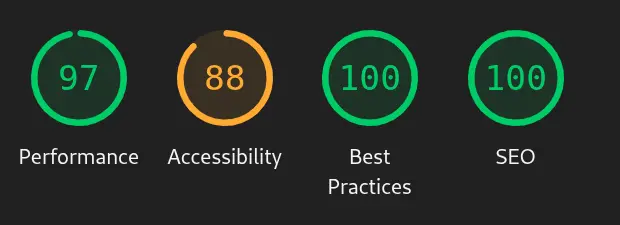
So I spent the better part of a day digging into Lighthouse reports and fixing what was broken. The result: scores now range from 96 to 100, with LCP stabilized and no visual regressions.
What Lighthouse Told Me
I ran Lighthouse on mobile and desktop for the home page and /articles. The gaps were obvious:
- Mobile LCP was 4+ seconds, dominated by the hero image span. Desktop was under two seconds.
- JavaScript payload was 830KB. Why? Because we were shipping
gray-matterandmarked—markdown parsing libraries—to the client, even though articles are static content. Major faux pas on my end. - Hero images were 1080px wide on mobile. A phone screen doesn’t need that. 480px would do.
- The
/articlespage was missing a<title>tag and other SEO metadata. Instant SEO score hit.
Image Optimization
Images were the low-hanging fruit. I converted all marketing imagery—hero images, feature images, article thumbnails—from .jpg to .webp. The gains were astonishing. I didn’t realize how much better WebP was until I saw the file sizes drop by 40-60% with no perceptible quality loss.
Then I created multiple variants for each image: 256px, 480px, 512px, and 1080px. I wired up srcset and sizes attributes so the browser picks the right one based on viewport width. For the article detail page, I used a <picture> element with media queries to force the 480px variant on mobile and the full 1080px on desktop.
The hero image is preloaded, but only for the right breakpoint. Vite’s build process initially stripped these preloads during SSR output, so I had to configure vite.config.ts to preserve them. The result: the hero paints immediately on load, and LCP dropped to 2.1-2.4 seconds on mobile.
Shrinking JavaScript
The 830KB bundle was unacceptable. Most of it was markdown parsing libraries that had no business running in the browser. Articles are static—they don’t change between builds. So I moved all markdown parsing to build time.
I wrote a script, build-articles.mjs, that runs during the build. It reads all markdown files from the content/articles directory, parses the frontmatter with gray-matter, converts the markdown to HTML with marked, and writes two JSON files:
article-summaries.json: title, slug, excerpt, date, and thumbnail for the/articleslist page.article-content.json: full HTML content for individual article detail pages.
The client-side code in articles.ts and articleContent.ts just imports these JSON files. No parsing, no processing, no markdown libraries in the bundle. The bundle dropped from 830KB to 425KB.
I also split routes and components. Non-home routes: /articles, /images, etc… are lazy-loaded. Heavy below-the-fold sections on the home page use React’s lazy() and Suspense to defer loading until the user scrolls. Visit novelfoundry.com and open DevTools to see the chunks load on demand.
Fixing Render Path Delays
LCP was still higher than I wanted. The hero image was preloaded and the bundle was smaller, but something was blocking the render. I found a few culprits:
- Backdrop blur on mobile navigation. TailwindCSS’s
backdrop-bluris expensive on mobile. It forces the browser into a costly compositing operation every frame. I disabled it for mobile viewports. The nav bar lost its transparency, but the performance gain was worth it. This was the only visual trade-off I made. - Below-the-fold sections. I applied
content-visibility: autoto sections that start offscreen. This tells the browser to skip rendering them until they’re about to enter the viewport.
Results
Mobile Lighthouse scores went from a low of 64 to a range of 92-99. LCP on mobile is now 2.1-2.4 seconds, down from 4+. Desktop LCP is around 0.4 seconds, with no Layout Shift.
The only visual change users will notice is the solid mobile nav bar. Everything else looks the same but loads faster.
What’s Next
I still need to review the bundle report to identify the largest remaining modules and decide if manual chunking would help. But the big gains are done. The marketing site is fast, the SEO scores are solid, and I didn’t break anything visual. A day well spent!
I’ll also start researching how to improve my accessibility score.