
From Debian Laptop Notes to a Real AI Lab Stack
My experiment last week — NemoClaw Setup: Thinkpad T14s, Debian 13.4 — was a success. Not a polished success, not an enterprise success, but a success nonetheless.
It answered the question that mattered at the time: can I get OpenShell, OpenClaw, and NemoClaw running on real Linux hardware, outside the clean-room fantasy of vendor demos and idealized docs? Yes. And once that answer became yes, the next question showed up immediately: can I operate this stack sanely, repeatedly, and safely?
That is a different question altogether. That’s what this article is about.
Proof-of-Life Matters
Early experiments don’t need to be elegant. They need to be real.
That first laptop build did exactly what it was supposed to do. It proved Debian was viable. It proved I didn’t need to wait for some polished, enterprise-sanctioned golden path before getting hands on keyboard. It let me stop reading about the stack and start interacting with it directly; which, in this new era, is where most actual learning begins.
It also proved something more important than “it boots.” It proved this stack was worth building around.
The docs confirm one of the key pain points I hit in that first round, because it turns out it wasn’t a personal failure at all. It was a product limitation:
Sandbox browser is not supported on the OpenShell backend. Source
That one line matters more than it may seem. It reframes the laptop experiment as proof-of-life, not failed architecture. The point was never to squeeze a permanent lab out of one Debian machine. The point was to learn enough to know what the next layer of infrastructure needed to be.
T14 Takeaways
I still think the laptop route was the correct opening move. It was cheap, immediate, and close to the metal. It let me validate Docker on Debian 13, get OpenShell installed, walk through the NemoClaw flow, and start thinking in terms of agents, workspaces, policies, tool boundaries, and swarm design. That was a meaningful threshold.
Once I crossed it, though, the machine stops being “a laptop running some tools” and starts becoming “the place where I’m trying to host an emerging AI lab.”
That distinction sounds semantic. It isn’t.
It’s the difference between experimentation and operations, and operations demand boundaries.
The Stack Stopped Being a Toy
This connects to the broader point I’ve been circling in my recent Vibe Coding posts Programming: No Winners, Only Survivors.
When AI increases how much one person can attempt, the bottleneck shifts. The hard part stops being whether you can generate code, wire tools together, or brute-force a setup script into submission. The hard part becomes whether the system around that speed is structured enough to survive it.
Higher velocity demands more guardrails, not fewer. That’s true for software teams and it’s equally true for solo builders standing up agent systems.
The more autonomy you unlock, the more your environment design starts to matter; that’s exactly where my Debian laptop stopped being good enough.
Debian Laptop → Proxmox Server
A laptop is excellent for proof-of-life. It’s not a great long-term substrate for an agent lab. (And I’m not entirely sure my single Proxmox server is sufficient either, since it already runs my home services. Might be time to pick up a second box on eBay.)
Session fragility
When you’re running gateway processes, shells, browser-linked tooling, Docker services, and experiments over SSH, you eventually discover the difference between “I can keep this alive” and “I can trust this to stay alive.” Tmux helps — and I still love tmux — but tmux is a coping mechanism for a machine doing too many jobs at once, not actual infrastructure.
Or else I’m just not terminal-native and it’s really a skill issue.
DevOps Toolbox offers a great tutorial: Tmux From Scratch To BEAST MODE and a tmux Cheat Sheet
Resource contention
Your primary workstation shouldn’t also be your lab. The same machine becomes your editor, your browser, your Docker host, your test box, your SSH jump point, and your agent runtime. Chrome fights containers. Containers fight local tooling. CPU limits, RAM pressure, and attention all become shared resources.
The machine you need for thinking becomes the machine you’re actively destabilizing.
Reproducibility decay
This is the one that always catches up with you. A laptop accumulates scar tissue. One-off fixes pile up, PATH hacks linger, package state drifts, and half-remembered shell tweaks become “part of the setup” even though they were never part of the setup at all.
Rebuilding the environment stops being a clean exercise and starts becoming archaeology.
Isolation gets harder as the swarm grows
One agent is easy to improvise around. A swarm is not.
The moment you want a stable OpenClaw environment, a browser-heavy test box, a Portainer VM, and a throwaway experiment machine all running simultaneously, the “just run it on my main Debian box” approach starts looking sloppy; and that’s before you account for needing ten or more agents running at once, each requiring its own support infrastructure. Support needs its own hardware allocation.
My homelab currently runs on an HP Z440 — a brilliant little machine that’s gotten me this far. It has a Xeon E5-2680 (8 cores, and each agent ideally wants 4) and 64GB RAM (each agent ideally wants 16), with 32GB and 8 cores already committed to home services, this gets tight. I can over-allocate RAM and live. I don’t want to do that on CPU, ever!
New Server: HP Z8 (G4 or G5)
This will cost more than my bike did brand new, but I expect to recoup it on the first project.
The main advantage of the upgrade is clean separation: home services stay on the Z440, and the new Z8 becomes the backbone for all AI agents and their supporting infrastructure.
The Proxmox Case
What Started This Weekend
What began as an OpenClaw/OpenShell-adjacent access issue turned into a host-level networking incident; and then it happened again. The investigation path eventually included bridge checks, direct-NIC testing, neighbor-table inspection, and ultimately the most humbling root cause imaginable: a frayed ethernet cable masquerading as a software problem.
That is exactly the kind of thing a growing lab must be designed to absorb. Not prevent all failure; that fantasy is dead. But contain failure, isolate it, recover cleanly, and learn faster. A useful lab isn’t one where nothing ever breaks. It’s one where breakage has boundaries.
Why Proxmox
Proxmox VE enters the picture not as a trendy homelab flex and not as a replacement for Docker or OpenShell, but as the infrastructure layer that gives both of them room to breathe.
Proxmox Virtual Environment is a complete, open-source server management platform for enterprise virtualization. It tightly integrates the KVM hypervisor and Linux Containers (LXC), software-defined storage and networking functionality, on a single platform.
Most importantly, it gives me the thing my laptop cannot: clean separation.
I don’t want my daily driver to also be the blast radius for browser automation, agent sandboxes, networking experiments, and setup scripts that may or may not go interesting halfway through.
With Proxmox, that separation becomes first-class.
The OpenClaw security guidance is blunt about browser control: a model driving a real browser can reach whatever that browser profile can reach, and host browser control should be treated carefully; especially when it’s pointed at your daily-driver state. That’s not a reason to avoid browser workflows.
It’s a reason to isolate them properly: Vibe Coding for Grown-Ups.
Combined with the fact that OpenShell currently doesn’t support sandbox browser on that backend, the architectural answer becomes obvious. Browser-heavy experimentation belongs in a dedicated environment, not spread across the same machine serving as your primary development workstation and stable lab runtime.
Snapshots Change Your Psychology
This is the real payoff.
Weird setup script? Snapshot first.
Risky Docker rework? Snapshot first.
New browser/MCP experiment? Snapshot first.
Fresh OpenClaw test environment? Snapshot first.
That sounds almost too obvious to say, but it matters. Proxmox snapshots preserve VM state, which means experimentation transforms from gambling into engineering.
Rollback beats archaeology every time.
Multiple Environments
A saner design appears almost immediately: one VM for Portainer and operational services, one for a stable OpenShell/OpenClaw environment, one for browser-heavy experiments and MCP tooling, and one for dangerous, disposable chaos.
That isn’t complexity for its own sake. That’s modularity buying back the ability to move fast without treating every test like a potential host outage. Creating Modularity
Docker
This needs to be said clearly, because people read “I’m moving to Proxmox” and hear “I’m abandoning containers.”
I’m not. Docker still matters. A lot!
So much so that I’m working through Docker Deep Dive by Nigel Poulton to give it the dedicated attention it deserves in my stack. Containers remain the easiest way to package, ship, rebuild, and reason about services. Portainer matters too; its own docs are explicit that Portainer Server and Agent run as lightweight Docker containers on a Docker engine.
So the architecture isn’t Docker or Proxmox. It’s Docker inside a Proxmox lab.
Proxmox is the lab floor. Docker is how the machines in that lab actually work. These tools solve different problems and stack cleanly because they operate at different layers: Proxmox handles host-level isolation and recovery, Docker handles service packaging and runtime consistency, and Portainer handles operational ergonomics for managing those containers.
OpenShell
The same clarification applies here. Per the docs, OpenShell is a managed sandbox backend for OpenClaw; a very specific role. It governs sandbox lifecycle, remote execution, and workspace behavior for agent turns. It’s not a hypervisor, not a datacenter layer, not a substitute for host-level segmentation.
It’s the sandbox for the agent runtimes.
That’s a powerful role, but it’s still one layer in a larger stack. The OpenShell docs make this even clearer by distinguishing between mirror and remote workspace models, each with different tradeoffs for local-vs-remote canonical state in runtime design.
I’m not moving away from OpenShell. I’m giving OpenShell a better home.
Full Design
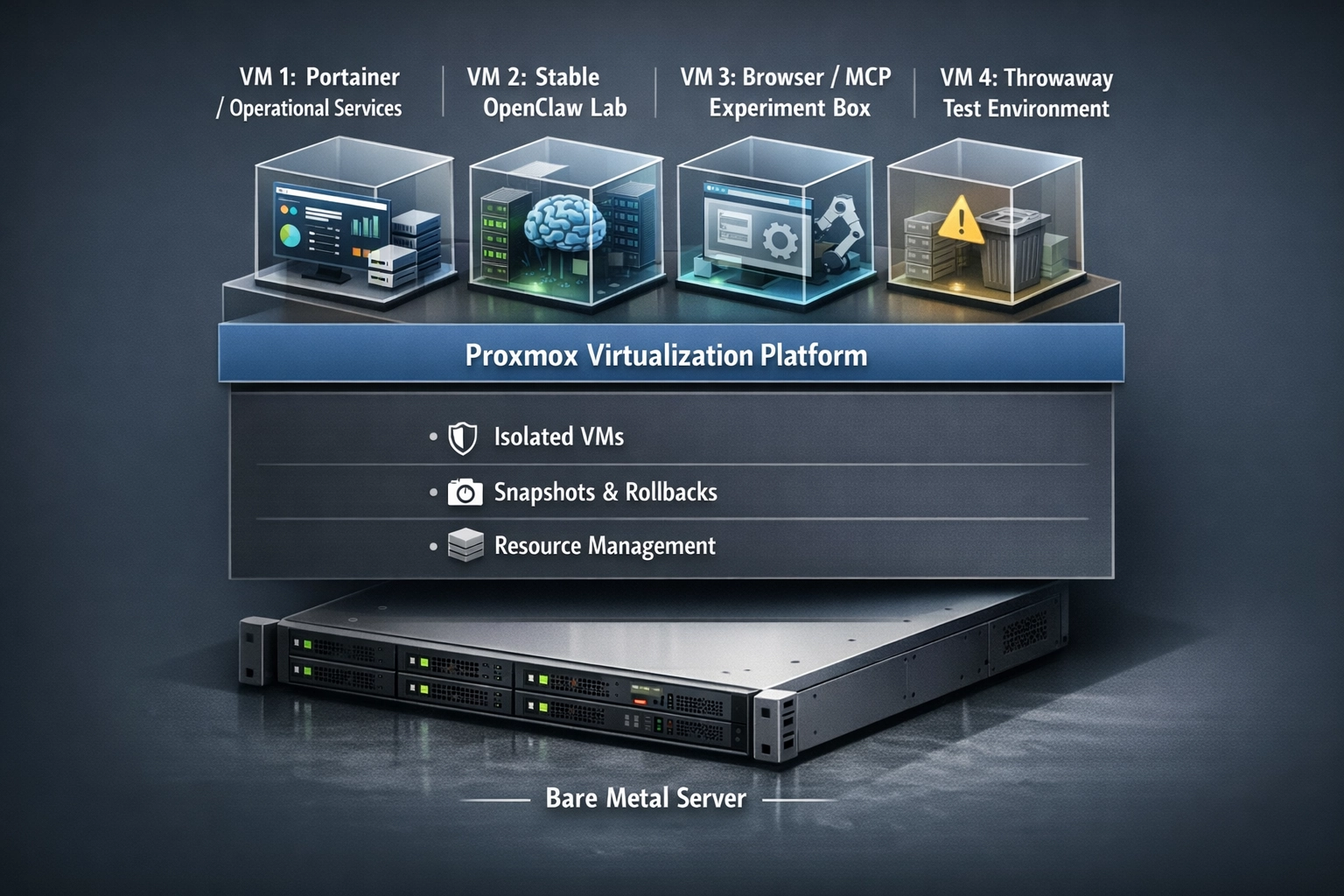
The stack is now easier to describe: Proxmox hosts the lab, VMs separate concerns, Docker and Portainer run the services, OpenShell remains the controlled execution boundary, OpenClaw is the agent runtime layer, and browser tooling and MCPs get their own isolated spaces.
Agent Swarms
This matters even more once the goal shifts from “my assistant works” to “my agent ecosystem is growing.”
A swarm is not just more prompts. It’s more trust boundaries, more tool permissions, more workspace rules, more failure modes, and more paths for accidental access. More opportunities for one experiment to poison another if the environments aren’t properly separated. Swarm design is infrastructure design.
That’s the real lesson from the last few weeks.
The exciting part is still the agents. But the leverage increasingly comes from the operating model around them. It’s the same story showing up across software right now: when one person can attempt more, the systems around that person matter more too.
Building Now
The path forward is straightforward. Stand up Proxmox as the durable lab host on the new HP Z8. Keep stable services separate from dangerous experiments.
Use Docker as the packaging layer for replaceable deployment, with Portainer as the management plane; the same way I use the Proxmox web portal, or how I built NovelFoundry on Dokploy. NovelFoundry Dokploy
Keep OpenShell in the stack and let it do the job it’s actually designed to do. And start treating browser tooling, MCP workflows, and swarm experiments like real infrastructure concerns instead of clever laptop tricks.
The ThinkPad phase wasn’t a mistake. It was the proof. This is the build design that comes after that proof.